
Building generative AI applications has moved decisively from speculative prototypes to production-grade systems that drive real business value. The critical differentiator between success and failure is no longer the novelty of the underlying model, but the quality, reliability, and efficiency of the development stack used to build, deploy, and maintain these systems.
This guide provides a comprehensive, vendor-neutral analysis of the essential tools for LLM engineers. We cut through the hype to deliver a decision-focused framework based on hands-on evaluation, real-world production requirements, and a full-stack perspective. Whether you're a startup building your first RAG application or an enterprise scaling a fleet of agents, the choices you make here will define your success.
I. Introduction: The AI Development Revolution
A critical transition defines the AI landscape of 2025: the shift from adoption to maturity. While the past few years were characterized by explosive growth in experimentation, today's focus is on bridging the persistent and costly gap between a working demo and a reliable, scalable production system.
The challenge is no longer "Can we build an AI feature?" but "Can we build one that is observable, governable, cost-effective, and safe?"
This is where tooling becomes paramount. The right development stack is a force multiplier, enabling teams to move faster, reduce operational overhead, and mitigate the inherent risks of non-deterministic systems.
Using the wrong stack or an incomplete one leads to technical debt, spiraling costs, and failed projects. A significant majority of AI prototypes still fail to make it into production, a reality attributable primarily to unforeseen complexities in deployment, monitoring, and maintenance. These failures often stem not from a flawed model, but from a flawed process unsupported by a coherent set of tools.
This guide is designed for practitioners who need to make critical decisions about tooling. Unlike vendor-centric content or high-level market maps, our analysis is grounded in the practical realities of the LLM development lifecycle.
We've evaluated each tool based on its ability to solve a specific, real-world problem within a modern stack. We provide transparent trade-offs, decision criteria for different use cases (from scrappy startups to regulated enterprises), and prescriptive stack recommendations you can implement today. This is not just a list of tools; it's a strategic framework for building better AI more efficiently.
II. The Modern LLM Development Stack Architecture
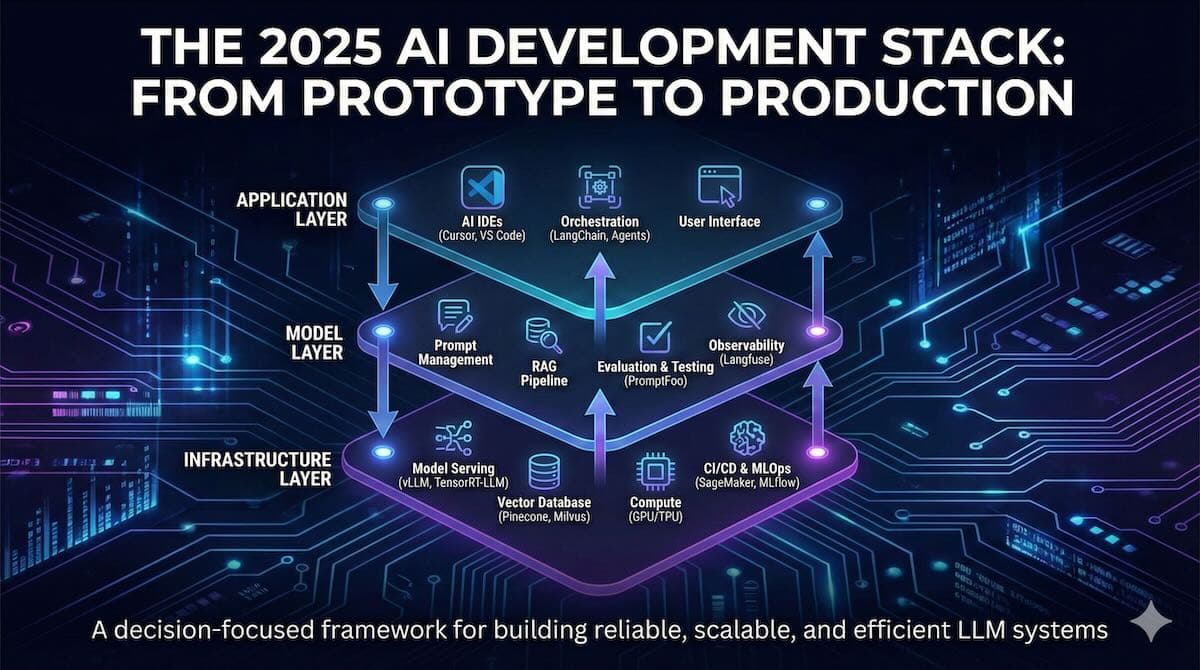
To select the right tools, you must first understand the architecture they support. The modern LLM development stack can be conceptualized in three distinct, interacting layers. This layered model helps clarify responsibilities, define interfaces, and ensure that every part of the development lifecycle is accounted for.
The Three-Layer Stack
Application Layer: The topmost layer where business logic resides and the user-facing experience is defined. It includes the application code (e.g., a Python backend using the API), user interfaces, and the orchestration logic that chains together LLM calls, data sources, and other services. Tools in this layer focus on defining workflows, managing state, and integrating AI capabilities into a broader software system.
Model Layer: The heart of the stack, this layer is responsible for everything related to the lifecycle of the language model itself. This includes prompt engineering and management, fine-tuning, retrieval-augmented generation (RAG) logic, model evaluation, and observability. This is where the core "intelligence" of the application is crafted and refined. It's also where the key differences between traditional MLOps and modern LLMOps become most apparent.
Infrastructure Layer: The foundation of the stack, this layer provides the computational resources needed to run the application and model layers. It includes model serving and inference engines, vector databases, compute resources (GPUs, TPUs), data storage, and CI/CD pipelines. The primary concerns here are performance, scalability, reliability, and cost-efficiency.
From MLOps to LLMOps: What's Different in 2025?
While LLMOps inherits principles from traditional MLOps (e.g., versioning, automation, monitoring), it introduces several unique challenges that demand specialized tools:
Prompt-Centric Workflows: Prompts are now a core part of the application logic, requiring their own lifecycle of versioning, testing, and deployment.
Retrieval-Augmented Generation (RAG): Managing external knowledge in vector databases has become a standard practice, introducing new infrastructure (vector DBs) and data pipelines (document chunking and embedding).
Non-Deterministic Evaluation: Evaluating LLM outputs is more complex than checking accuracy scores. It requires qualitative assessments, human-in-the-loop feedback, and testing for issues like hallucination, bias, and toxicity.
Agentic Systems: Orchestrating multiple LLM-powered agents that can plan and execute tasks introduces new complexities in debugging, tracing, and state management.
Inference Cost Management: With powerful foundation models, the primary operational cost shifts from training to inference. LLMOps tooling must provide granular cost tracking and optimization at the API call level.
Diagram Description for Your Designer
Title: The 3-Layer LLM Application Stack
Visual: A stack of three horizontal blocks. Top to bottom: "Application Layer," "Model Layer," "Infrastructure Layer."
Application Layer Block: Contains icons/labels for "Business Logic (API)," "Orchestration (Agents)," and "User Interface." An arrow labeled "User Request" points to this layer.
Model Layer Block: Contains icons/labels for "Prompt Management," "RAG Pipeline," "Evaluation & Testing," and "Observability." This layer should display a cyclical arrow labeled "Develop > Evaluate > Refine."
Infrastructure Layer Block: Contains icons/labels for "Model Serving (Inference)," "Vector Database," "Compute (GPU/CPU)," and "CI/CD." An arrow labeled "Model Response" points up from this layer.
Flow Arrows:
A primary arrow flows down from Application to Model to Infrastructure, labeled "Execution Flow."
Another arrow flows up from Infrastructure to Model to Application, labeled "Data & Results Flow."
An arrow from the RAG Pipeline in the Model Layer points down to the Vector Database in the Infrastructure Layer.
This architecture provides a clear map of how different tool categories fit together to form a cohesive, production-ready system.
III. Category 1: AI-Powered IDEs and Code Editors
The IDE is the command center for any developer. In 2025, the distinction between a simple text editor and an AI-native development environment has become stark. The best tools don't just autocomplete code; they act as collaborative partners, understanding context across the entire codebase, automating complex refactors, and providing an interactive canvas for brainstorming and debugging.
Editor's Choice: Cursor
Cursor solidifies its position as the top choice for engineers who want a more comprehensive experience without leaving the familiarity of VS Code. It's a fork of VS Code, meaning all your extensions and settings work out of the box, but with deeply integrated AI features that go far beyond simple chat.
Its "Edit in Place" functionality, agentic "Fix & Edit" commands, and code-base-aware context management make it feel like an actual pair programmer. The ability to bring your own API key for models like GPT-5 and Claude 4.5 Sonnet provides crucial flexibility and cost control.
Contenders and Alternatives
Windsurf: A strong competitor to Cursor, Windsurf (from the creators of Codeium) provides a full-featured, AI-native IDE built on a VS Code fork. Its "Cascade" assistant offers powerful, multi-step code generation, and its custom rules system is excellent for enforcing team-specific coding standards. It's a great choice for teams seeking a slightly different approach to the AI-first IDE paradigm.
Claude Code (VS Code Extension): A powerful option for developers seeking advanced autonomy. Recent upgrades include a native VS Code extension, checkpoint systems for safely testing complex changes, subagents for breaking down large tasks, and an enhanced terminal user experience. It excels at delegating long-running, multi-step refactors across an entire repository with built-in guardrails. [Source 2]
VS Code + Cline: For those who prefer to augment the standard VS Code experience, this remains a powerful combination. Cline adds agentic workflows (plan-review-execute loops) and multi-model support through integrations with OpenRouter, AWS Bedrock, and local models via Ollama. This approach offers maximum customizability, vendor-neutrality, and control over data privacy. [Source 4]
Gemini CLI: Google's open-source, terminal-first AI agent is an excellent choice for developers who live in the command line. With a 1M-token context window, built-in search and file operations, and multi-provider support, it's designed for auditable, scriptable workflows that integrate easily with CI/CD pipelines and shell scripts.
JetBrains AI Assistant: A must-have for developers already invested in the JetBrains ecosystem (IntelliJ, PyCharm, etc.). Its key strength is the deep integration with the IDE's powerful code intelligence and refactoring tools. It understands your project's structure at a semantic level, yielding highly accurate, context-aware suggestions.
Comparison Table: AI-Powered IDEs
Tool | Best For | Strengths | Limitations | Pricing (Oct 2025) | Notable Integrations | Hosting/Licensing |
Cursor | AI-native individual developers and teams | Deep VS Code integration, agentic editing, BYO API key, codebase-wide context | Can feel slower than vanilla VS Code on large projects. | See the official pricing page | GPT-4o, Claude 3.5, Gemini | SaaS |
Windsurf | Teams seeking a collaborative AI IDE | Real-time AI collaboration, Super Complete intent prediction, custom rule engine | Newer entrant, smaller community compared to the VS Code ecosystem. | See the official pricing page | All major LLMs | SaaS |
Claude Code (VS Code) | Autonomous, large-scale code refactoring | Checkpoints for safe experimentation, subagents for complex tasks, and background execution | Focused on autonomous tasks rather than inline completion. | See the official pricing page | Claude 3.5 Sonnet | Commercial / SaaS |
VS Code + Cline | Developers wanting maximum flexibility & open source | Highly customizable, supports local models (Ollama), vendor-neutral (OpenRouter) | Requires manual setup and configuration of multiple extensions. | Free (cost is for model APIs) | OpenRouter, AWS Bedrock, Ollama | Open Source (MIT) |
Gemini CLI | Terminal-native, auditable automation | 1M-token context, scriptable, built-in tools, multi-provider support | Terminal-based workflow may not suit all developers. | Free (cost is for model APIs) | Google AI, Anthropic (via MCP) | Open Source (Apache 2.0) |
JetBrains AI Assistant | Enterprise teams in the JetBrains ecosystem | Deep semantic code understanding, tight integration with refactoring tools | Tied to JetBrains IDEs, with less model flexibility than others. | See the official pricing page | OpenAI, proprietary models | Commercial |
How to Choose Your AI-Powered IDE
For the AI Purist / Startup: Choose Cursor. It provides the most seamless and powerful AI-first experience with minimal setup.
For the Enterprise Team: Choose JetBrains AI Assistant if you're already a JetBrains shop due to its security and deep code intelligence. If you're a VS Code enterprise, a business plan for GitHub Copilot combined with standard VS Code is the safe, well-supported choice.
For Autonomous, Large-Scchoiceanges: Choose Claude Code. Its checkpoint-and-subagent system is purpose-built to execute complex, repo-wide refactorings safely.
For Auditable, Scriptable Workflows: Choose Gemini CLI. It is ideal for developers who want to integrate AI into their shell scripts, CI/CD pipelines, and terminal-based workflows.
For the Privacy-Conscious / Tinkerer: The VS Code + Cline stack is unbeatable. It's free and open-source, giving you complete control over which models you use, including free local ones via Ollama, ensuring no vendor lock-in.
IV. Category 2: LLM Development Frameworks & Orchestration
Frameworks provide the scaffolding for building complex LLM applications. They abstract away the boilerplate code for common patterns, such as RAG, agentic workflows, and tool usage, allowing developers to focus on application logic. In 2025, the landscape has matured beyond simple chaining to include sophisticated orchestration, debugging, and data handling capabilities.
Editor's Choice: LangChain
Despite a crowded field, LangChain remains the editor's choice due to its unparalleled ecosystem, flexibility, and the maturity of its production tooling, particularly LangSmith. LangChain provides a comprehensive set of building blocks for virtually any LLM application, from simple RAG to complex multi-agent systems.
Its expression language (LCEL) provides a robust, transparent approach to composing chains, ensuring workflows are both debuggable and production-ready. While its initial learning curve can be steep due to its broad scope, the investment pays off with a framework that scales with your application. The tight integration with LangSmith for tracing and debugging is a killer feature that no other framework can fully match.
Key Contenders
LlamaIndex: While LangChain is a general-purpose framework, LlamaIndex is laser-focused on optimizing RAG pipelines. It excels at complex data ingestion, indexing, and advanced retrieval strategies (e.g., recursive retrieval, query transformations). If your application is heavily centered on building a sophisticated question-answering system over a large corpus of documents, LlamaIndex is often the superior choice for that specific task. Mchoiceams use LlamaIndex for the data/RAG layer and LangChain for the agent/orchestration layer.
Haystack: An open-source framework from DeepSet, Haystack offers a more modular and pipeline-centric approach. It's powerful in production environments, with native support for Elasticsearch and OpenSearch. Its visual pipeline builder, Haystack Pipelines, can be an excellent asset for teams that prefer a more declarative, low-code approach to building their NLP systems.
Dify: Dify is a "LLMops" platform that combines a user-friendly UI for prompt engineering and agent creation with a backend-as-a-service. It's an excellent choice for teams who want to accelerate development and offload backend mabackendt. It provides a visual interface for building RAG applications and agents, making it accessible to non-technical team members while still offering an API for developers.
Specialized Frameworks
vLLM: While primarily a serving engine (covered later), vLLM's library is increasingly used directly in development for high-performance offline inference and batch processing tasks. Its PagedAttention and other optimizations make it a critical component for any performance-sensitive part of the stack. [Source 8]
Unstructured: A crucial utility library for any RAG pipeline. Unstructured is a data transformation framework that excels at parsing and chunking complex, messy file formats like PDFs, HTML, and Word documents into clean, LLM-ready text. It's the essential first step in nearly every RAG workflow. [Source 9]
Decision Matrix: Choosing Your Framework
Criteria | LangChain | LlamaIndex | Haystack | Dify |
Primary Use Case | General-purpose orchestration, agents, complex chains | Advanced RAG, data indexing & retrieval | Production NLP pipelines, search systems | Rapid prototyping, BAAS, and visual workflow building |
Complexity | High (due to scope) | Medium | Medium | Low |
Flexibility | Very High | High (within RAG) | High | Medium (UI-driven) |
Ecosystem & Integrations | Unmatched | Excellent (data sources) | Good (search dbs) | Good (models, tools) |
Debugging/Observability | Excellent (with LangSmith) | Good | Good | Good (built-in logs) |
Best For... | Teams needing a versatile, "do-everything" framework for complex, evolving applications. | Teams are building sophisticated, data-intensive question-answering and search applications. | Teams with existing Elasticsearch/OpenSearch infrastructure or who prefer a declarative pipeline approach. | Startups, product managers, and teams looking to ship a simple RAG or agent app quickly. |
The modern stack often involves more than one framework. A common and highly effective pattern is to use Unstructured for data parsing, LlamaIndex for ingestion and retrieval, and LangChain for the final orchestration and agentic logic. This modular approach enables you to utilize the most suitable tool for each part of the job.
V. Category 3: Model Serving & Deployment Platforms
Once your model or LLM application is built, it needs to be served reliably, efficiently, and at scale. Model serving is a specialized infrastructure problem that involves loading large model weights into GPU memory, handling concurrent requests, and optimizing for both latency (response speed) and throughput (the number of responses per second).
Editor's Choice: vLLM
vLLM has become the choice as an open-source standard for high-performance LLM inference. Its core innovation, PagedAttention, significantly reduces memory waste, allowing for higher batch sizes and lower latency.
This translates directly to higher throughput and lower costs. Documented production adoption includes powering Amazon Rufus and LinkedIn AI features, and the project maintains strategic collaborations with industry leaders like NVIDIA and AWS. [Source 8] It delivers high throughput and concurrency via PagedAttention and speculative decoding; in NVIDIA-optimized stacks, TensorRT-LLM may lead on raw latency/efficiency, while TGI remains the most straightforward HF-centric deployment path.
Key Contenders
TensorRT-LLM (NVIDIA): For teams running on NVIDIA GPUs and seeking the absolute maximum performance, TensorRT-LLM is the top contender. It is an open-source library that compiles LLMs into optimized engines, leveraging NVIDIA's TensorRT deep learning optimizer and its powerful CUDA Graphs feature. It requires a model compilation step, but the resulting performance, especially for static batch sizes, can be unparalleled. It's the best choice for highly optimized, sinchoicedel production endpoints where every microsecond of latency counts.
Text Generation Inference (TGI) (Hugging Face): TGI is a production-grade Rust/Python/gRPC server developed and battle-tested by Hugging Face. It's incredibly easy to use, especially for models hosted on the Hugging Face Hub. It offers robustness, token streaming, and continuous batching, making it an excellent choice for teams seeking a reliable and easy-to-manage serving solution within the Hugging Face ecosystem.
BentoML: A comprehensive model serving framework that standardizes the entire process of packaging and deploying models. It's not limited to LLMs and provides a unified workflow for any ML model. Its strength lies in its flexibility and its ability to create standardized "Bentos" (model archives) that can be deployed to various targets, including Docker, Kubernetes, or serverless platforms. It's an excellent choice for teams that need to manage a diverse portfolio of ML models, not just LLMs.
KServe: For teams heavily invested in Kubernetes, KServe provides a standardized, serverless inference solution on top of the container orchestrator. It offers a consistent, straightforward way to deploy models, with autoscaling, traffic splitting (for A/B testing), and an inference graph for multi-model pipelines. It's an infrastructure-level choice that provides a solid foundation for model serving within a Cloud Native ecosystem.
Deployment Strategy Guidance
Your choice of serving platform has achoiceund impact on your deployment strategy. It should be carefully considered in relation to your hardware, ecosystem, and tolerance for vendor lock-in risk.
For High-Throughput & Broad OSS Model Support: Use vLLM deployed on a Kubernetes cluster with GPU nodes. This delivers the best general-purpose performance for high concurrency and the flexibility to serve multiple open-source models efficiently.
For Lowest Latency on NVIDIA GPUs: Use TensorRT-LLM. This is ideal for critical, latency-sensitive applications where you can dedicate NVIDIA GPU resources to a single, highly optimized model.
For Rapid Deployment from the Hugging Face Ecosystem: Use TGI. It's the path of least resistance from a model on the Hub to a production API endpoint.
For serverless and bursty workloads, use a cloud-managed platform like AWS SageMaker Serverless Inference or Google Cloud Run with GPU support. This is ideal for applications with unpredictable traffic, as you only pay for compute when requests are being processed.
What to verify: Confirm GPU plan availability in your target region and account for potential cold-start latency impacts on user experience.
For a Standardized, multi-framework platform, use BentoML or KServe to create a unified deployment process across all your ML models, including LLMs, to avoid tool fragmentation.
VI. Category 4: Observability & Debugging Platforms
You cannot manage what you cannot measure. This is especially true for LLM applications, where non-deterministic outputs, complex internal reasoning, and opaque API costs can quickly lead to production failures and budget overruns. LLM observability platforms provide the critical "flight recorder" needed to understand what your application is doing, why it's doing it, and how much it costs.
Editor's Choice: Langfuse
Langfuse earns the editor's choice as the leading open-source choice for visibility. It's under the MIT license, announced in 2024, making it a no-brainer for teams who want to avoid vendor lock-in and host it themselves for maximum data privacy. [Source 14] Langfuse is framework-agnostic, meaning it works seamlessly with LangChain, LlamaIndex, or your own custom code. Its UI is clean and powerful, providing detailed request traces, cost breakdowns by model and user, and robust evaluation features for tracking quality over time. The ability to collect human feedback and use it to create evaluation datasets directly within the platform closes the loop on continuous improvement.
Key Contenders
LangSmith: For teams building exclusively with LangChain, LangSmith is an unbeatable choice. The integration is seamless and automatic, providing unparalleled visibility into the inner workings of LangChain Expression Language (LCEL) chains and agents. Its strength lies in its deep, native tracing, dataset management, and experiment analysis capabilities, which are explicitly tailored for LangChain's abstractions. The primary limitation is its tight integration with the LangChain ecosystem. [Source 15]
Helicone: A simple, powerful, and easy-to-integrate proxy for your LLM API calls. By pointing your requests to Helicone's endpoint, you get immediate access to logging, caching, rate limiting, and analytics without needing to add SDKs to your code. Its strength lies in its simplicity and powerful caching layer, which can dramatically reduce costs and latency for repeated queries.
Lunary: Another strong open-source contender in the space, offering a clean UI and solid tracing and evaluation features. It strikes a good balance between functionality and simplicity, and its open-source nature makes it an attractive alternative to Langfuse for teams that prefer its user experience or specific integrations.
Comparison Table: LLM Observability Platforms
Tool | Best For | Strengths | Limitations | Pricing (Oct 2025) | Notable Integrations | Hosting/Licensing |
Langfuse | Teams wanting a powerful, open-source, and self-hostable solution | Framework-agnostic, MIT licensed, strong eval & feedback features, cost tracking | Self-hosting requires operational overhead. | See the official pricing page | LangChain, LlamaIndex, OpenAI, Anthropic | MIT / SaaS |
LangSmith | Teams are heavily invested in the LangChain ecosystem | Seamless integration with LangChain; deep tracing & eval for LCEL | Tightly coupled to LangChain; less value for non-LangChain apps | See the official pricing page | LangChain | SaaS |
Helicone | Teams needing a simple proxy with powerful caching and analytics | Easy, code-free integration via proxy; intelligent caching; user-level analytics | Less focus on deep trace visualization and complex evaluations. | See the official pricing page | All major LLMs | SaaS |
Lunary | Teams looking for a clean, open-source alternative to Langfuse | Simple UI, open-source, good balance of features | Smaller community and ecosystem compared to Langfuse. | See the official pricing page | OpenAI, Anthropic, etc. | AGPL / SaaS |
How to Choose Your Observability Platform
If you are all-in on LangChain: Use LangSmith. The benefits of the deep, native integration for debugging and evaluation are too significant to ignore.
If you want flexibility, control, and no vendor lock-in: Use Langfuse. Its open-source nature, robust feature set, and framework-agnostic approach make it the best long-term, strategic choice for most teams.
If your choice goal is to reduce API costs and latency, start with Helicone. Its proxy-based caching is incredibly effective and easy to implement. You can use it in addition to another observability tool.
To standardize your measurement plan, evaluate platforms from a holistic perspective. Comparing LangWatch, LangSmith, Braintrust, and Langfuse can help you define your core requirements for tracing, evaluation, and cost management across different stacks.
VII. Category 5: Testing & Evaluation Frameworks
If observability tells you what your application did, evaluation tells you if what it did was good. Evaluating LLM applications is notoriously tricky due to their non-deterministic nature. A good evaluation framework automates testing application quality against predefined criteria, helping you catch regressions, compare model performance, and ensure your application behaves as expected.
Editor's Choice: PromptFoo
PromptFoo has emerged as the leading open-source framework for LLM testing and evaluation. Its strength lies in its simplicity and versatility. It allows you to define test cases in simple YAML or JSON files, specify different prompts and models to compare, and define assertions (e.g., "contains JSON," "is not toxic," "costs less than $0.01") to score the outputs automatically. It can be run as a command-line tool, making it easy to integrate into CI/CD pipelines. Additionally, it offers a web UI for visual comparison of outputs. This combination of ease of use, CI/CD integration, and comprehensive assertion capabilities makes it an essential tool for any team serious about LLM quality.
Key Contenders
Braintrust: Braintrust is an enterprise-grade evaluation platform that offers a more managed, "evals-as-a-service" experience. You can upload datasets, run experiments, and track performance over time through their web UI. It's great for collaboration among developers, product managers, and subject matter experts to help create and score evaluation datasets. It's a powerful choice for large teams that need a centralized platform to manage all their evaluation efforts.
Weights & Biases (W&B): While traditionally known for experiment tracking in model training, W&B has powerful features for LLM evaluation. You can log pprompt-response pairs, model outputs, and evaluation metrics to W&B Tables, enabling rich visualization, comparison, and analysis. It's an excellent choice for teams already using W&B for model development, as it keeps all experimentation and evaluation data in one place.
Traditional UI Test Tools (Testim, Mabl): Remember that if your LLM application has a user interface, it still needs traditional end-to-end testing. AI-powered testing tools, such as Testim and Mabl, are adapting to handle the dynamic nature of LLM outputs. They can help ensure that the UI correctly displays responses, handles streaming, and doesn't break when the LLM produces an unexpected format.
Layers of LLM Application Testing
A comprehensive testing strategy involves multiple layers:
Unit Tests: Test individual components in isolation. Does your data parsing function accurately handle PDFs? Does your prompt template render as expected?
Integration Tests: Test how components work together. Does your RAG pipeline successfully retrieve documents and pass them to the LLM?
Performance Tests: Test the speed and scalability of your application. What is the end-to-end latency (p95)? How many concurrent users can it handle?
Quality / "Eval" Tests: Test the quality of the LLM's output. Is the response accurate? Is it helpful? Is it free from bias? This is where tools like PromptFoo and Braintrust shine.
UI/E2E Tests: Test the complete user experience from the front end to back-end tools, using Testim and Mabl. Integrating a tool like PromptFoo into your CI/CD pipeline is a crucial step toward achieving production maturity. Every code change should trigger an evaluation run against a "golden dataset" of test cases to ensure you haven't introduced a regression in quality.
VIII. Category 6: Data Management & Vector Databases
For most production LLM applications, especially those using RAG, the vector database has become a non-negotiable piece of the infrastructure. These specialized databases are designed to store and efficiently query high-dimensional vectors (embeddings) that represent the semantic meaning of your data. The choice of a vector database has significant implications for performance, scalability, and operational overhead.
Leading Vector Database Platforms
Pinecone: Pinecone is the market leader in managed, cloud-native vector databases. Its primary selling point is simplicity and performance without operational headaches. It's a serverless solution that automatically scales, making it an excellent choice for teams who want to focus on their application rather than managing database infrastructure. Its metadata filtering capabilities are robust, allowing for powerful hybrid search.
Weaviate: Weaviate is a robust open-source vector database that offers both a managed service and self-hosting options. Its key differentiator is its built-in data model (a graph-based schema) and its support for a wide range of embedding models out of the box. It's a highly flexible, feature-rich option for teams that want greater control and customization.
Chroma: Chroma is an open-source, "developer-first" vector database designed for simplicity and ease of use. It can run in-memory, making it incredibly fast to get started with for development and small-scale applications. While it may not have the enterprise-grade scaling features of Milvus or Pinecone, its simplicity makes it a favorite for prototyping and for applications where the vector store is embedded directly within the application.
Zilliz (Milvus): Milvus is the most popular open-source vector database for large-scale, enterprise deployments. It's highly scalable, supporting billions of vectors, and offers a high degree of configurability over indexing methods and consistency levels. It requires more operational expertise to manage, but for teams that need to self-host a massive-scale vector search engine, Milvus is the gold standard.
PostgreSQL + pgvector: For teams already using PostgreSQL, the pgvector extension is an increasingly viable option. It allows you to store vectors directly in your primary database, simplifying your stack. While its performance may not match dedicated vector databases at extreme scale, it's more than sufficient for many applications and dramatically reduces operational complexity. Supabase provides an excellent managed experience for Postgres with pgvector.
How to Choose Your Vector Database
The choice boils down to a trade-off between managed simplicity, performance at scale, and operational control.
For maximum simplicity and the fastest time-to-market, choose Pinecone. It's the easiest way to get a production-ready, high-performance vector database up and running.
For an open-source solution that strikes a good balance between features and ease of use, consider Weaviate or Chroma. Weaviate is more feature-rich, while Chroma is simpler to embed and get started with.
To simplify your existing stack, choose PostgreSQL + pgvector. If you're already using Postgres and your scale is moderate, this is the most operationally efficient choice.
For massive-scale, self-choice deployments: Choose Zilliz (Milvus). It's built for scale and offers the most control for teams with the DevOps expertise to manage it.
Note on Selection Criteria: Performance requirements should be the primary factor in your final decision. Key factors to evaluate include hybrid search (combining vector search with metadata filters), recall targets (typically greater than95% for RAG), and p95 latency SLAs under your expected query load.
IX. Category 7: MLOps & LLMOps Platforms
As LLM applications move into production, they need the same level of operational rigor as any other mission-critical software. MLOps platforms provide the backbone for this, offering tools for experiment tracking, model versioning, deployment automation, and governance. While some tools are general-purpose, the best ones have adapted to the specific needs of LLMOps.
Editor's Choice (Cloud): AWS SageMaker
For teams operating within the AWS ecosystem, SageMaker provides the most comprehensive, end-to-end platform for the entire machine learning lifecycle. It has matured significantly for LLMOps, featuring capabilities such as SageMaker Studio for collaborative development, JumpStart for pre-trained foundation models, specialized LLM inference endpoints, and robust pipelines to automate workflows. Its tight integration with other AWS services (such as S3 for data storage and IAM for security) makes it the default choice for enterprises that need a secure, scalable, and fully managed platform.
Editor's Choice (Open Source): MLflow
MLflow remains the leading open-source MLOps platform due to its simplicity, modularity, and vendor-neutrality. It consists of four primary components: Tracking (for logging experiments), Projects (for packaging code), Models (for managing and deploying models), and a Model Registry (for versioning and lifecycle management). MLflow's light-weight nature means you can adopt the components you need without buying into a monolithic system. Its broad industry support ensures it integrates well with almost any other tool in your stack. It's the perfect choice for teams that want a flexible, best-of-breed MLOps stack without being locked into a single cloud provider.
Key Contenders
Google Cloud Vertex AI: The primary competitor to SageMaker, Vertex AI offers a similarly comprehensive suite of tools on Google Cloud. It excels in its integration with Google's own foundation models (Gemini family), BigQuery for data analysis, and its powerful hardware options, such as TPUs. For teams on GCP, it's a top-tier choice.
Azure Machine Learning: Microsoft's offering is a strong contender, particularly for enterprises heavily invested in the Azure and Microsoft 365 ecosystems. It features a user-friendly studio interface, responsible AI tooling, and seamless integration with services like Azure OpenAI.
Weights & Biases (W&B): While often used for evaluation, W&B is a full-fledged MLOps platform with a primary focus on experiment tracking and collaboration. Its beautiful UI and powerful visualization tools make it a favorite among researchers and ML engineers for tracking experiments, comparing model performance, and creating detailed reports. It's often used alongside a platform such as SageMaker or MLflow to enhance experimentation.
Databricks: The Databricks platform has evolved from a big data processing engine to a unified data and AI platform. With its acquisition of MosaicML and the development of MLflow (originating at Databricks), it offers a compelling, all-in-one solution for data preparation, model training, and deployment, particularly for enterprises managing massive datasets.
Focus on Governance, Lineage, and Pipelines
When selecting a platform, look beyond the basic features and focus on what's needed for production governance:
Model Registry: Is there a central place to version, stage (dev, staging, prod), and document your models and prompts?
Data & Model Lineage: Can you trace a prediction back to the exact version of the model, prompt, and data that produced it? This is critical for debugging and compliance.
Automated Pipelines: Does the platform enable you to automate the entire workflow, from data ingestion to model deployment, using CI/CD principles?
For LLMOps, this extends to prompt and RAG artifact lineage. You need to be able to track which version of a prompt template and which set of retrieved documents were used for any given generation. Platforms such as SageMaker, Vertex AI, and MLflow are increasingly adding features to address LLM-specific governance challenges.
X. Category 8: AI Code Generation & Productivity
This category focuses on tools that assist developers by generating, completing, and explaining code directly within their workflow. While related to the AI-powered IDEs in Category 1, these tools are often add-ins that can be used across different editors and are explicitly focused on writing code, rather than transforming the entire development environment. It's essential to note that OpenAI's legacy Codex models have been deprecated; modern coding tasks now rely on the current GPT-4 and GPT-4o class models.
Editor's Choice: GitHub Copilot
GitHub Copilot remains the undisputed leader in this space. Its deep integration with VS Code, JetBrains, and other IDEs, combined with the power of OpenAI's latest models, delivers a seamless, highly effective code-completion experience.
The introduction of Copilot Chat brought conversational interaction, allowing developers to ask questions about their codebase, get explanations for complex code blocks, and generate unit tests. For enterprise teams, Copilot's security features, policy controls, and support for training on internal codebases make it the safest and most powerful choice. Its ubiquity and continuous improvement keep it ahead of the competition.
Key Contenders
Tabnine: Tabnine has been a strong competitor for years, distinguishing itself with its focus on privacy and personalization. It can be run entirely locally or on a self-hosted server, ensuring that your code never leaves your control. It also excels at learning your team's specific coding patterns and conventions, providing completions that are highly tailored to your internal style. This makes it a top choice for organizations with strict data privacy requirements.
Amazon Q Developer: Amazon's entry into this space is compelling for teams building on AWS. Q Developer possesses in-depth knowledge of AWS APIs and best practices, and can provide expert guidance on utilizing the AWS SDKs, troubleshooting IAM policies, and optimizing cloud infrastructure. Its feature for upgrading application code (e.g., from one Java version to another) is a unique and powerful capability. [Source 35]
Pieces: a unique productivity tool. It acts as a "smart code snippet manager." It automatically saves useful snippets as you work, allows you to enrich them with context, and makes them easily searchable and reusable. Its integration with IDEs and browsers creates a seamless workflow for capturing and reusing code, a common yet often overlooked aspect of a developer's day.
Addressing Key Concerns
Privacy: This is the number one concern for enterprises adopting these tools. Tabnine leads with its self-hosting options. GitHub Copilot for Business and Amazon Q also have strong privacy policies that prevent your code from being used for training public models.
On-Premise Deployment: For air-gapped or highly secure environments, Tabnine's self-hosted offering is the best solution.
SDLC Coverage: The trend is for these tools to expand beyond just writing code. GitHub Copilot is integrating with pull requests and security scanning. Amazon Q assists with infrastructure and upgrades. Select a tool that aligns with the parts of the software development lifecycle (SDLC) you want to accelerate the most.
For most developers, GitHub Copilot provides the best general-purpose performance and feature set. However, for those with specific needs around AWS development or data privacy, Amazon Q and Tabnine are excellent, specialized alternatives.
XI. Building Your 2025 LLM Development Stack: Decision Framework
Choosing individual tools is only half the battle. The real challenge is assembling them into a coherent, cost-effective stack that matches your team's size, budget, and goals. Below are three prescriptive stack archetypes, an implementation roadmap, and a cost-management framework.
Prescriptive Stacks
1. The Early-Stage Startup Stack (~$100–$300/mo)
Goal: Speed, iteration, and low cost.
IDE: Cursor or VS Code + Cline (for maximum flexibility).
Framework: LangChain for orchestration.
Observability: Langfuse (Cloud free tier or self-hosted).
Evaluation: PromptFoo (run locally and in CI/CD).
Vector DB: Chroma (in-memory) or Supabase (Postgres + pgvector free tier).
Serving: Modal or Replicate for serverless, pay-per-use deployment.
Philosophy: Use managed services with generous free tiers and open-source tools that are easy to set up. Avoid infrastructure overhead at all costs.
2. The Enterprise Production Stack (~$2k–10k+/mo)
Goal: Scalability, governance, security, and reliability.
IDE: JetBrains AI Assistant, Claude Code, or VS Code + GitHub Copilot for Business.
Framework: LangChain or Haystack.
Observability: Langfuse (self-hosted) or an enterprise observability platform.
Evaluation: Braintrust or PromptFoo integrated into a formal CI/CD pipeline.
Vector DB: Pinecone (managed) or Zilliz (Milvus) (self-hosted for scale/control).
LLMOps Platform: AWS SageMaker, Google Vertex AI, or Azure ML.
Serving: vLLM or TensorRT-LLM on a dedicated Kubernetes cluster managed by the cloud MLOps platform.
Philosophy: Prioritize security, control, and scalability. Select tools that offer robust enterprise support, comprehensive audit logs, and robust compliance features.
3. The Research & Dev Stack
Goal: Rapid experimentation, collaboration, and performance tracking.
IDE: Cursor for its AI-first features.
Framework: A mix of LangChain and LlamaIndex for flexibility.
Observability/Tracking: Weights & Biases (W&B) to track every experiment meticulously.
Evaluation: PromptFoo and custom scripts logging results to W&B.
Vector DB: Chroma running locally.
LLMOps Platform: MLflow for tracking and model registry.
Serving: Local serving with Ollama and vLLM for performance testing.
Philosophy: Everything should be optimized for fast iteration and comparison. The entire stack should be runnable on a local machine or a single cloud instance.
Implementation Roadmap
Phase 1: Scaffolding & Prototyping (Weeks 1-2)
Goal: Build a working end-to-end "happy path" version of your application.
Checklist:
[ ] Set up your IDE (Cursor/VS Code).
[ ] Initialize a project with your chosen framework (LangChain).
[ ] Integrate your observability SDK (Langfuse).
[ ] Set up a dev instance of your vector DB (Chroma/Supabase) and load a small sample of data.
[ ] Write your first evaluation tests using PromptFoo.
Phase 2: Productionizing (Weeks 3-6)
Goal: Make the application robust, reliable, and deployable.
Checklist:
[ ] Migrate from dev vector DB to a production instance (Pinecone/Milvus).
[ ] Set up a CI/CD pipeline that runs your PromptFoo evals on every commit.
[ ] Containerize your application with Docker.
[ ] Deploy your application to a staging environment using your serving platform (vLLM/SageMaker).
[ ] Set up dashboards and alerts in your observability tool (Langfuse).
Phase 3: Scaling & Optimization (Ongoing)
Goal: Improve performance, reduce costs, and add new features.
Checklist:
[ ] Analyze cost and latency dashboards to identify bottlenecks.
[ ] Implement a caching layer (Helicone or custom).
[ ] Conduct load testing to determine scaling limits.
[ ] Set up a feedback loop for collecting user data to improve your evaluation datasets.
[ ] Begin A/B testing different models and prompts using your MLOps platform.
Cost Optimization & Calculator
Managing LLM costs is crucial. Use this simple formula to estimate your monthly spend.
# Simple Monthly Cost Calculator Formula
monthly_cost = ((ide_seats ide_seat_price) +
(observability_seats observability_seat_price) +
(api_calls_per_day 30 avg_cost_per_call) +
(vector_db_gb cost_per_gb) +
(gpu_hours_per_month cost_per_gpu_hour))
Key Cost Optimization Strategies:
Model Choice: Don't use GPT-4o when a smaller, faster model like Claude 3.5 Sonnet or Gemini 2.0 Flash will do.
Caching: Cache responses for identical or similar prompts. This can be the single biggest cost saver.
Batching: Send multiple requests to your model-serving endpoint simultaneously to improve GPU utilization.
Prompt Optimization: Shorter, more efficient prompts utilize fewer tokens and incur lower costs.
Monitoring: Use your observability tool to consistently and accurately track cost per user or per transaction.
Text-Based Decision Tree
A designer can convert this logic into a flowchart:
1. Start: What is your team size?
1-10 Engineers: Go to 2.
10+ Engineers: Go to 3.
2. Small Team: Is your primary goal speed or control?
Speed: Choose the Early-Stage Startup Stack.
Control/Research: Choose the Research & Dev Stack.
3. (Large Team) Do you have strict data security or compliance needs?
Yes (Regulated Industry): Go to 4.
No: Choose the Enterprise Production Stack with a preference for managed services (e.g., Pinecone, SageMaker).
4. (Secure/Enterprise) Do you have an existing Kubernetes team/expertise?
Yes: Choose the Enterprise Production Stack with a preference for self-hosted, open-source tools (e.g., Langfuse, Milvus, vLLM on K8S).
No: Choose the Enterprise Production Stack but rely on the security and compliance features of a single primary cloud provider (e.g., go all-in on AWS SageMaker and its associated services).
XII. Future-Proofing Your AI Development Stack
The only constant in AI is change. The tools and techniques that are cutting-edge today may be obsolete in 18 months. Building a future-proof stack is not about predicting the future, but about making architectural choices that anticipate and accommodate change.
Key Trends to Watch
Multimodality: Models are increasingly able to understand and generate not just text, but also images, audio, and video. Your stack, especially your data ingestion pipelines (Unstructured) and observability tools (Langfuse), should be able to handle these new data types.
Edge & On-Device AI: As models become smaller and more efficient, inference will shift from the cloud to edge devices, such as phones and laptops. This will require tools that can manage and deploy models in resource-constrained environments.
Compliance & Regulation: Legislation like the EU AI Act will impose new requirements for transparency, explainability, and risk management. Your MLOps platform must provide the lineage and documentation capabilities needed to demonstrate compliance.
Sustainability (Green AI): The computational cost, and therefore the environmental impact, of AI is a growing concern. Expect to see more tools and techniques focused on optimizing for energy efficiency, not just performance.
Principles for a Resilient Stack
Modularity & API-First Design: Build your system from loosely coupled components that communicate through well-defined APIs. This makes it easy to replace one component (e.g., your vector database) with another without rewriting the entire application.
Prioritize Vendor Independence: Where possible, favor open-source tools (MLflow, Langfuse, vLLM) and open standards. This prevents vendor lock-in, giving you the flexibility to adapt as the market changes.
Invest in Strong Communities: Choose tools with active, growing communities. A strong community means better support, more integrations, and a higher likelihood that the tool will be maintained and improved over the long term.
Emphasize Interoperability: Ensure your tools integrate seamlessly. Does your framework have a good integration for your observability tool? Can your MLOps platform deploy to your chosen serving engine? A cohesive stack is more than the sum of its parts.
Ultimately, the most future-proof skill is the ability to learn and adapt. Encourage a culture of continuous learning on your team and be prepared to re-evaluate your stack regularly.
XIII. Conclusion
The journey from a Jupyter notebook to a production-grade AI application is complex, but it is no longer uncharted territory. The tooling landscape in 2025 provides a mature, comprehensive ecosystem that supports every stage of the LLM development lifecycle.
The key to success is not to adopt every new tool that comes along, but to make deliberate, strategic choices that align with your specific goals, constraints, and team culture.
A well-architected stack, built on the principles of modularity, observability, and automation, is the foundation upon which great AI products are built. It empowers your team to move quickly, experiment safely, and deliver value reliably.
Next Steps & Recommendations
For Beginners: Start with the Early-Stage Startup Stack. Focus on learning one tool from each core category: an IDE (Cursor), a framework (LangChain), an observability tool (Langfuse), and a deployment platform (Modal). Build a simple RAG application from end to end.
For Enterprises: Begin by auditing your current stack against the architecture described in this guide. Identify gaps, particularly in LLM-specific areas like observability, evaluation, and governance. Use the Enterprise Production Stack as a reference architecture for your next-generation AI platform.
For Researchers: Adopt the Research & Dev Stack to bring more rigor to your experimentation. Utilize W&B and MLflow to ensure your work is reproducible, and leverage PromptFoo to incorporate automated quality checks into your research workflow.
For All Production Teams: If you take only one thing away from this guide, let it be this: invest in observability and evaluation from the very beginning. You cannot improve what you cannot measure, and in the world of non-deterministic AI, robust measurement is the only path to production reliability.
The tools are ready. The patterns are established. It's time to build.
XIV. Frequently Asked Questions (FAQs)
What is the single most common mistake teams make when building their first LLM app?
The most common mistake is underestimating the "last mile" problem. They focus 90% of their effort on the prompt and the core logic (the fun part) and only 10% on testing, monitoring, and deployment infrastructure. A successful project inverts this, treating production readiness as a first-class concern from the outset.
Do I really need a vector database? Can't I use a regular database?
For small-scale applications or prototypes, you can often get by with pgvector in an existing PostgreSQL database. However, once you need to scale to millions of documents or require sub-second latency on complex queries with metadata filters, a dedicated vector database like Pinecone or Milvus will almost always provide superior performance and features.
Should I use an open-source LLM or a proprietary one, like GPT-4?
This depends on your use case, budget, and privacy requirements. Proprietary models often offer the highest performance with zero setup, but can be expensive and create vendor lock-in. Open-source models (run via a serving tool like vLLM) provide greater control and privacy, and lower long-term costs, but require more infrastructure management. A common strategy is to prototype with a proprietary API and then fine-tune or switch to an open-source model for production scale.
How much should I budget for my LLM development stack?
As the "Building Your Stack" section shows, this can range from under $100/month for a lean startup to tens of thousands for a large enterprise. The highest variable costs are typically GPU hours for serving models and API costs for proprietary models. Start with the provided cost calculator formula and adjust it based on your expected usage.
What's the difference between LangChain and LlamaIndex?
Think of LangChain as a general-purpose "Swiss Army knife" for building any LLM application (agents, chains, tool use). LlamaIndex is a specialized "scalpel" for creating the best possible RAG pipelines. They are not mutually exclusive; many of the best RAG applications use LlamaIndex for data handling and LangChain for application orchestration.
How do I integrate human feedback into my development process?
This is critical for continuous improvement. Your observability platform (e.g., Langfuse) should include features that allow users or internal reviewers to provide feedback, such as a thumbs-up or thumbs-down options or suggestions for correcting model outputs. This feedback should be collected into a dataset and used to create new, more challenging evaluations within your testing framework (such as PromptFoo). This creates a virtuous cycle of feedback, evaluation, and improvement.
Is fine-tuning a foundation model still necessary in 2025?
The need for fine-tuning has decreased thanks to the power of in-context learning with RAG and advanced prompting techniques. However, it remains a powerful tool for specific use cases, such as teaching a model a unique style or tone, adapting it to a highly specialized domain with domain-specific jargon, or reducing latency and cost by distilling a large model into a smaller, more efficient one.