
Key Takeaways
The HubSpot Agent CLI ships 15 pre-built skill files in under 5 minutes, ideal for standard CRM workflows with zero engineering overhead.
The HubSpot MCP server provides typed, discoverable tools via per-user OAuth, giving you team permission enforcement without building auth infrastructure (HubSpot MCP Docs, 2026).
Custom Claude Code skills unlock custom objects, delete operations, and cross-system orchestration - the choice when your workflow doesn't fit a pre-built pattern.
For most teams, the right answer is a hybrid: MCP server for daily CRM ops plus a lightweight custom skill for the 20% of edge cases. Agencies managing multiple clients should add the Agent CLI for standardized, repeatable client onboarding.
Introduction
In early 2026, HubSpot shipped not one but three distinct paths for connecting AI coding agents to your CRM. The Agent CLI (May 2026, 15 markdown skill files). The HubSpot MCP server (GA as of April 2026, at https://mcp.hubspot.com). And the existing REST API (CRM objects now date-versioned as 2026-03; Search and Lists APIs retain v3 paths during the migration period. (New to building custom skills? See our Claude Code custom skills guide for the step-by-step.) Each path makes a different trade-off between setup speed, capability depth, and engineering control.
If you are a HubSpot partner, the question isn't academic. Pick the wrong path, and you're either over-engineering a simple client need or under-delivering on a complex one. So which trade-off matters most to your team: setup speed, capability depth, or per-user safety? Pick the right combination, and your team moves faster than competitors who are still clicking through the HubSpot UI.
HubSpot's engineering team built an early automated code-review system on an internal platform called Crucible, which ran Claude Code instances in Kubernetes (Cloud Coding Agents at HubSpot, January 2026); HubSpot has since rewritten that reviewer on a different internal agent framework (Automated Code Review: The 6-Month Evolution). The takeaway is cultural rather than a shared codebase: HubSpot routes its coding agents through staged gates before changes land, and the Agent CLI applies a comparable philosophy to CRM operations. They are separate systems, built by different teams for different domains.
HubSpot Developers demonstrate the Developer MCP server scaffolding CMS projects from plain-language descriptions. Note: this is HubSpot's local development MCP server for app/CMS projects, not the remote CRM MCP server at mcp.hubspot.com that this article compares.
Quick Comparison Table
Category | HubSpot Agent CLI | HubSpot MCP Server | Custom Claude Code Skill (API) |
|---|---|---|---|
Setup Time | ~5 minutes ( | ~10 minutes (OAuth PKCE setup) | 30 to 60 minutes (Private App + tool definitions) |
Tools/Features | 15 pre-built skill files | Typed tools (CRM read/write + campaigns) | Unlimited - any API endpoint |
Auth Model | HubSpot CLI session | OAuth 2.1 with PKCE (mandatory) | Private App token, per-user Private Apps, or custom OAuth |
Custom Objects | Schema management only | Not supported | Full CRUD via objects API |
Delete Operations | Not available | Not exposed as a tool | Available via direct API calls |
Bulk Operations | Built-in JSONL pipes, pagination | 200 results/page, 100 IDs/request | DIY, you handle batching |
Rate Limits | Handled transparently | Built into the server | You manage retry/backoff logic |
Cross-System Workflows | HubSpot-only | HubSpot-only (single server) | Unlimited - any external API |
LLM Portability | Claude Code, Codex, Cursor | MCP-compatible clients (Claude, Gemini, etc.) | Claude Code, Codex, Cursor (markdown+curl) |
Maintenance | HubSpot maintains | HubSpot maintains a server | You maintain everything |
Production Readiness | Private beta | GA (April 2026) | GA (stable REST API) |
Sensitive Data Handling | HubSpot-managed | Activity objects are blocked if enabled | Depends on your scoping |
Team Permission Enforcement | Shared credentials bypass user permissions | Per-user OAuth respects HubSpot permissions | Shared token (default), per-user Private Apps (manual), or custom OAuth (engineering lift) |
Multi-Client Support (Agencies) | Repeatable: one CLI auth per client | Individual OAuth per client instance | One Private App per client (manual at scale) |
Our Verdict | Win: zero-config CRM ops | Win: multi-system agents, typed safety, per-user auth | Win: custom objects, cross-system, full control |
Who Should Choose What
Most teams fall into one of five clear patterns based on their CRM complexity and team size—and the wrong choice can lead to either unnecessary engineering overhead or the loss of critical capabilities.
If you only read one section, make it this one.
Sales and RevOps teams running standard HubSpot workflows: Start with the Agent CLI. The 15 pre-built skills cover pipeline management, deal tracking, ticket resolution, data quality, and sales reporting - exactly the work that consumes ops teams' time - with a five-minute setup. If you hit a limitation (custom objects, cross-system needs), add the MCP server as a supplement.
Engineering teams building multi-system AI agents: Use the HubSpot MCP server. Its typed tool schemas and protocol-standard design mean you can swap LLM providers without rewriting anything. Connect alongside Slack's MCP server, Gmail's, and whatever else your agent touches. Reserve custom API skills for the operations that the MCP server doesn't support.
Teams with heavy custom objects or cross-system workflows: Build a custom Claude Code skill via the HubSpot API. You need custom objects, delete operations, webhook-driven automation, or workflows that chain HubSpot to enrichment, then to Slack, then to email. The 30- to 60-minute setup is a one-time cost.
Agencies managing multiple client HubSpot instances: Install the Agent CLI for standardized per-client CRM operations. It's fast, safe, and consistent across clients - every engagement starts from the same 15-skill baseline. Supplement with a custom skill for cross-client reporting, custom object access, and agency-specific workflows that don't fit the pre-built patterns. For more on automating multi-client RevOps, see our AI agent orchestration guide. For per-client permission enforcement, the MCP server is the right call, but it requires individual OAuth setup per client instance, which adds onboarding friction for high-volume agencies.
Teams with multiple Claude Code users who need per-user HubSpot permissions: Use the MCP server exclusively. This is non-negotiable. The MCP server's per-user OAuth PKCE flow means your SDR can only see their owned deals, your marketing manager has read-only CRM access, and your sales VP can view the full pipeline. Combine with Claude Code for Teams managed settings (allowManagedMcpServersOnly, deny "Bash(curl *)") to enforce that the MCP server is the only path to HubSpot data.
If none of these fit, HubSpot's native Workflows or Zapier handle simpler triggers without an AI agent. Reserve Claude Code integration for tasks that need reasoning: data classification, enrichment decisions, or multi-step conditional logic that a rules engine can't express.
For HubSpot Partners: The fastest path to standardize across clients is the Agent CLI. One
npx skillscommand per client engagement. Same 15 skills. Same safety patterns. Same training. When a client needs custom objects or cross-system workflows, add a lightweight custom skill. When they need per-user permissions (enterprise clients, compliance requirements), switch to the MCP server. The three paths stack - they don't compete.
What Are the Three Paths and How Do They Differ?
HubSpot now offers three distinct integration architectures—a 15-skill CLI bundle, a typed MCP server with 12 discoverable tools, and the full REST API surface—each trading managed safety for engineering control in a different ratio.

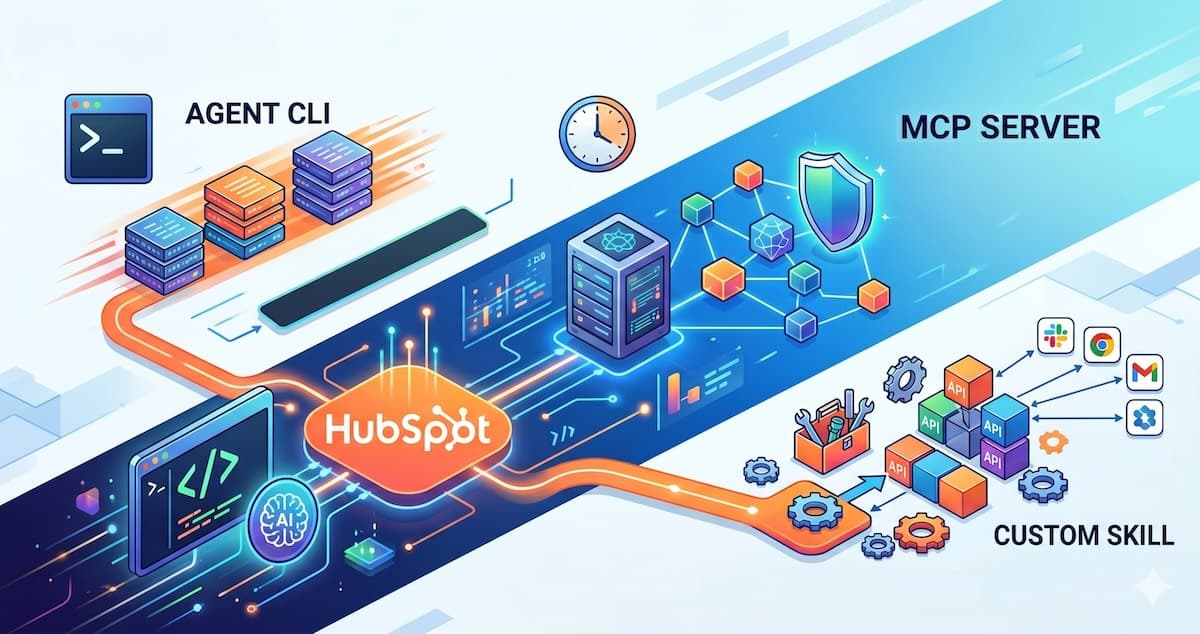
Each path operates at a different infrastructure layer: Agent CLI runs locally, the HubSpot hosts the MCP server, and custom skills use the REST API directly.
Path 1: HubSpot Agent CLI - The Turnkey Approach
This isn't a standalone binary. It's 15 markdown skill files installed via npm that teach AI agents how to use the hubspot CLI:
npx skills hubspot/agent-cli-skills
The 15 skills cover: bulk operations (the foundation), CRM-lookup, deal-management, sales-execution, sales-reporting, ticket-resolution, audience-targeting, CRM-data-quality, customer-retention, data-enrichment, quote-to-cash, workflow-automation, team-ownership, communication-history, and custom-object-management.
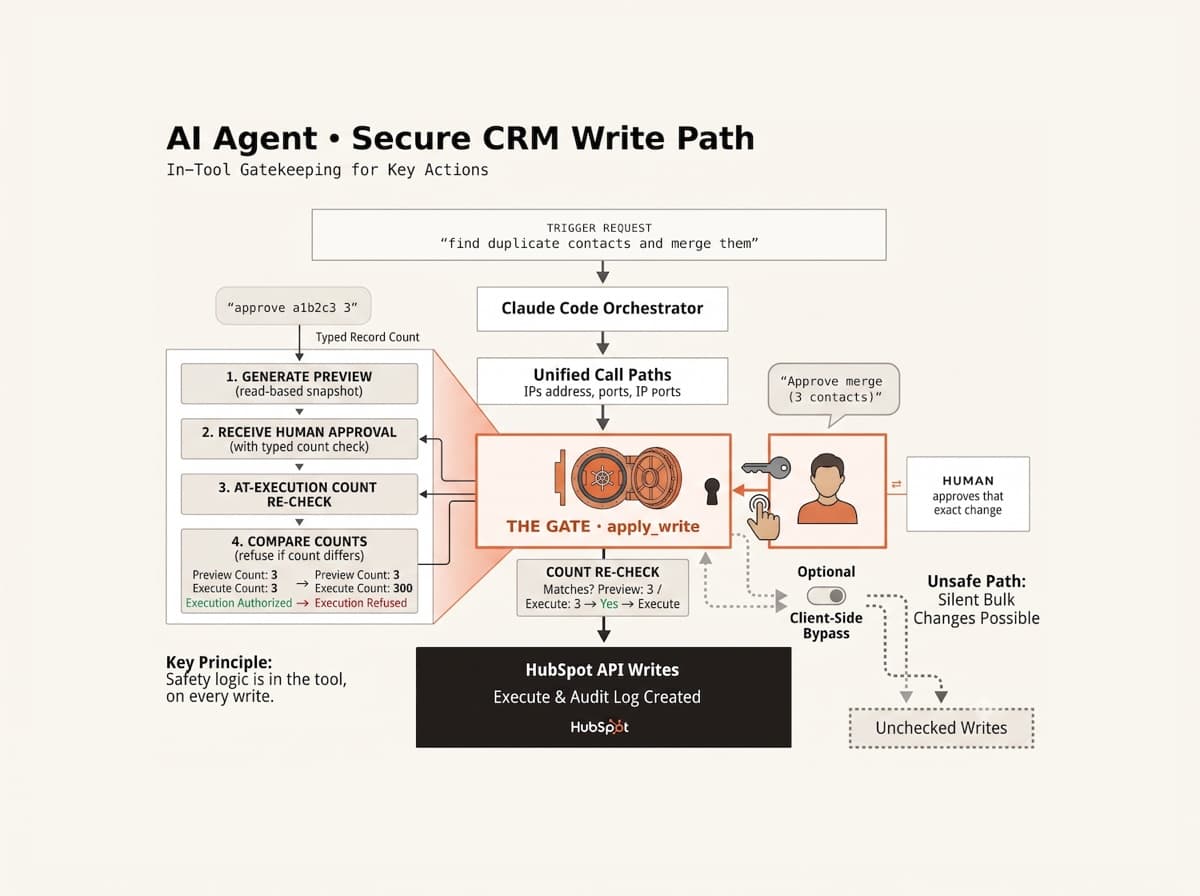
Every skill inherits from bulk-operations, which enforces a three-phase safety gate for destructive operations: dry-run (preview), digest (review impact), confirm (explicit approval). Recovery is handled via hubspot history.
The Agent CLI is designed for autonomous, scheduled work - Monday morning pipeline reports, inactive-contact cleanup scans, and pre-call research briefs. It's the "set it and forget it" option.
Path 2: HubSpot MCP Server - The Standard Protocol
Launched as a public beta in September 2025 and GA since April 2026, HubSpot's remote MCP server (https://mcp.hubspot.com) implements Anthropic's Model Context Protocol to expose typed tools for CRM and campaign operations. (Not familiar with MCP? Read our Model Context Protocol overview.) Setup uses OAuth 2.1 with PKCE - no API key to manage:
claude mcp add --transport http --scope user hubspot https://mcp.hubspot.com
After authenticating inside Claude Code (browser OAuth flow), you get these tools:
Tool | Capability |
|---|---|
| Account info, per-object access check |
| Filter CRM records (5 filter groups, 6 filters each, 200/page) |
| Fetch up to 100 objects by ID |
| Create or update CRM records and activities |
| Keyword search for property schemas |
| Full property types, enums, validation rules |
| Search record owners by name, email, or ID |
| Paginated campaign contact lists |
| Campaign metrics and revenue attribution |
| Discoverable campaign content types |
| CRM object metrics per campaign |
| Submit feedback to HubSpot |
Read access covers contacts, companies, deals, tickets, products, quotes, invoices, subscriptions, segments, and activities (calls, emails, meetings, notes, tasks), as well as content objects (blog posts, landing pages, campaigns). Write access covers contacts, companies, deals, tickets, line items, products, and activities.
The MCP server's key architectural advantage is that typed tool schemas sharply reduce the risk of AI hallucinations. Claude Code discovers property names at runtime via find_property_definitions and get_property_detail rather than guessing from memory. In practice, this eliminates one of the most common failure modes of raw API calls, where a model writes to a field name it assumed existed but that doesn't match the actual schema.
HubSpot's remote MCP server exposes typed tools covering CRM read/write operations and campaign analytics, with property schemas discoverable at runtime rather than hardcoded in prompt instructions (HubSpot MCP Tools Reference, 2026). The exact tool count varies by HubSpot subscription tier and available scopes; call get_user_details to see which tools your account can access. This schema-driven design means AI agents adapt to each portal's actual field layout. If a team renames their "dealstage" property to "pipeline_phase," the MCP server automatically discovers and uses the new name, eliminating the silent data corruption that occurs when agents write to assumed property names.
A limitation worth noting: if your HubSpot account has Sensitive Data enabled, activity objects (calls, emails, meetings, notes, tasks) are blocked through the MCP server even though they remain accessible through the standard API.
Path 3: Custom Claude Code Skill - Full API Control
Building a custom skill means wiring Claude Code directly to HubSpot's REST API. The simplest approach uses a Private App token:
curl -H "Authorization: Bearer $HUBSPOT_TOKEN" \
  https://api.hubapi.com/crm/objects/2026-03/contacts
You define every tool, every endpoint, every validation rule. HubSpot's API covers CRM objects (contacts, companies, deals, tickets, products, line items, quotes, custom objects), marketing (emails, forms, lists), CMS (pages, blogs, themes, HubDB), commerce (invoices, payments, subscriptions), and the new Agent Tools API (beta) for building agent extensions directly on HubSpot's platform (HubSpot API Reference).
Here's what a minimal custom skill tool definition looks like in practice:
### search_contacts

Search HubSpot contacts by property value. Returns up to 100 results.

**Parameters:**
- `property` (string, required): HubSpot property internal name (e.g., "email", "company")
- `value` (string, required): Value to search for
- `limit` (number, optional): Max results (default 50, max 100)

**Usage:**
curl -H "Authorization: Bearer $HUBSPOT_TOKEN" \
  "https://api.hubapi.com/crm/v3/objects/contacts/search" \
  -d '{"filterGroups":[{"filters":[{"propertyName":"'$property'","operator":"EQ","value":"'$value'"}]}],"limit":'$limit'}'
The key advantage over both the Agent CLI and the MCP server: you're not limited to HubSpot. A custom skill can pull HubSpot contacts, enrich them via Clearbit or Apollo, check LinkedIn activity, draft outreach, create a deal, and notify Slack - all in one Claude Code session. Neither the Agent CLI nor the MCP server can cross system boundaries.
Ben Holley (AirOps) demonstrates how to run entire outbound campaigns from Claude Code, wiring 10+ APIs, including HubSpot, into a single terminal workflow.
For HubSpot Partners: A custom skill is your differentiator. Build it once for a common client need (say, "segment contacts by last engagement date and create a re-engagement list"), and you can deploy it across every client that fits the pattern. The 30 to 60 minute initial build pays for itself on the second deployment.
What Each Path Can (and Can't) Do - Full Capability Matrix
Before diving into the comparison categories, here's the definitive list of operations each path supports. If you're trying to decide between paths, start here.
CRM Objects
Operation | Agent CLI | MCP Server | Custom API Skill |
|---|---|---|---|
Read contacts, companies, deals, and tickets | ✅ | ✅ | ✅ |
Create/update contacts, companies, deals, and tickets | ✅ | ✅ | ✅ |
Read products | ✅ | ✅ | ✅ |
Create/update products | ✅ (via quote-to-cash) | ✅ | ✅ |
Read quotes, invoices, and subscriptions. | ✅ | ✅ (read-only) | ✅ |
Create/update quotes, invoices | ✅ (via quote-to-cash) | ❌ | ✅ |
Delete any CRM records.d | ❌ | ❌ | ✅ |
Read custom object records | ❌ (schema only) | ❌ | ✅ |
Create/update custom object records. | ❌ | ❌ | ✅ |
Delete custom object records. | ❌ | ❌ | ✅ |
Bulk operations (>10 records) | ✅ (JSONL pipes) | ✅ (100/batch) | ✅ (100/batch, custom batching) |
Full data exports (>10K records) | ✅ (JSONL, unlimited) | ❌ (Search API 10K limit) | ✅ (getPage API, unlimited) |
Activities and Engagement
Operation | Agent CLI | MCP Server | Custom API Skill |
|---|---|---|---|
Read calls, emails, meetings, notes, tasks | ✅ | ✅ (unless Sensitive Data enabled) | ✅ |
Create calls, emails, meetings, notes, tasks | ✅ (sales-execution) | ✅ | ✅ |
Read marketing emails sent/received.d | ❌ | ❌ | ✅ (Marketing API) |
Access engagement history for pre-call briefs | ✅ (communication-history) | ✅ | ✅ |
Marketing and Campaigns
Operation | Agent CLI | MCP Server | Custom API Skill |
|---|---|---|---|
Read campaign analytics | ❌ | ✅ | ✅ |
List campaign contacts | ❌ | ✅ | ✅ |
Read marketing email performance | ❌ | ❌ | ✅ (Marketing API) |
Manage lists/segments | ✅ (audience-targeting) | ❌ | ✅ (Lists API) |
Create/manage forms | ❌ | ❌ | ✅ (Forms API) |
Automation and Workflows
Operation | Agent CLI | MCP Server | Custom API Skill |
|---|---|---|---|
List existing workflows | ✅ (workflow-automation) | ❌ | ✅ |
Create a new workflow | ✅ (workflow-automation) | ❌ | ✅ |
Update/delete workfl.ows | ✅ | ❌ | ✅ |
Define enrollment triggers and actions | ✅ (via CLI) | ❌ | ✅ |
Enroll records in workf.lows | ❌ | ❌ | ✅ (Workflows v4 API) |
Build complex multi-step automations | ❌ (CLI-based) | ❌ | ✅ (full API, blueprint pattern) |
Advanced Operations
Operation | Agent CLI | MCP Server | Custom API Skill | |
|---|---|---|---|---|
Schema/property management | ✅ (custom-object-management) | ✅ (find/get properties) | ✅ | |
Owner assignment and audit | ✅ (team-ownership) | ✅ (find_owners) | ✅ | |
Data enrichment (external sources) | ❌ (HubSpot-only) | ❌ (HubSpot-only) | ✅ (any API) | |
Webhook-driven automation | ❌ | ❌ | ✅ | |
Cross-system orchestration | ❌ (single server) | ❌ (single server) | ✅ (any API) | |
Custom validation logic | ❌ (HubSpot rules only) | ❌ (HubSpot rules only) | ✅ (you define it) | |
Audit trail logging | HubSpot | bspot history) | ✅ (OAuth audit) | ✅ (custom) |
Per-user permission enforcement | ❌ | ✅ | Optional (see Category 7) |
Key Limitations to Watch For
Agent CLI: No deletes ever. No custom object records. No marketing campaigns. Workflow management is CLI-based with template-driven creation; programmatic enrollment triggers and multi-step conditional logic require the API. The
hubspotCLI auth is a shared credential - every team member gets the same CRM access regardless of their HubSpot role.MCP Server: No deletes. No custom objects. No workflows. No forms. Engagement data is blocked if Sensitive Data is on. Search capped at 10,000 results. Separately, the Claude. The AI HubSpot connector (a different product from the Agent CLI) has a 10-record limit that community users have noted can be bypassed via Claude loops, raising a data integrity concern for admins (HubSpot Community: Connector Permissioning Needs, May 2026).
Custom API Skill: No pre-built guardrails. You handle pagination, rate limits, retries, schema drift, and API version migrations yourself. The Search API uses a 10,000-result hard limit - use
getPagethe basic API for full exports instead. Full flexibility means full responsibility.
Advanced Operations: Workflows, Pagination, and Blueprints
Some of the most powerful CRM automation patterns are only possible with direct API access. Here's what that looks like in practice.
Technical Deep Dive: The next three sections cover pagination mechanics, workflow automation via API, and reusable blueprints. If you're a HubSpot Partner evaluating capabilities at a high level, skip to Category 1: Setup Speed. If you're the technical lead who's been forwarded this post, this is where the detail lives.
Building Automated Workflows via the API
HubSpot's Workflows v4 API (/automation/v4/flows) lets you programmatically create, update, and delete workflows with enrollment triggers, conditional branching, delays, and CRM actions. This is available only through the custom API skill path.
The MCP server has no workflow tools. The Agent CLI has workflow-automation skills, but they're CLI-template-based - you can create a workflow from a template. Still, you can't programmatically define custom enrollment criteria, chain multi-step actions, or enroll records programmatically.
With the API, a Claude Code skill can dynamically build workflows. Example prompts:
"Create a workflow that enrolls contacts when they submit the demo request form, waits 2 hours, creates a follow-up task for the assigned owner, and adds the contact to the 'New Leads' list."
"Find all inactive workflows for deals that haven't been modified in 90 days and disable them."
The Workflows v4 API requires the automation scope and is currently in beta. Combined with the CRM API, it turns Claude Code into a workflow automation engine: define the logic in natural language, and the skill translates it into API calls.
Here's what a workflow creation call looks like through a custom skill:
curl -X POST -H "Authorization: Bearer $HUBSPOT_TOKEN" \
  "https://api.hubapi.com/automation/v4/flows" \
  -d '{
    "name": "Demo Request Follow-up",
    "type": "CONTACT",
    "enrollmentCriteria": {
      "type": "FORM_SUBMISSION",
      "formId": "12345"
    }
  }'
How Pagination Works Across the Three Paths
Pagination is where the paths diverge sharply. These limits matter once your CRM grows beyond a few thousand records.
Agent CLI: Uses JSONL pipes for data transfer. The bulk-operations foundation skill handles pagination transparently - hubspot CLI commands stream results to stdout in JSONL format, and the skill files teach Claude Code to parse, filter, and batch them. Pagination is unlimited. If you have 100,000 contacts, the Agent CLI streams them all.
MCP Server: Uses the CRM Search API under the hood. The search_crm_records tool supports up to 5 filter groups with 6 filters each, returns a maximum of 200 results per page, and caps at 10,000 total results (Search API limit). The get_crm_records_by_ids tool fetches up to 100 objects per call. For most operational workflows, these limits are fine. But you can't export your full CRM via the MCP server.
Custom API Skill: You have full control and two pagination strategies:
getPage pagination (recommended for exports): Uses the basic API (
/crm/v3/objects/{type}) with cursor-based pagination viapaging.next.after. No record count limit - you can export your entire CRM. The established pattern is an async generator that yields records as they arrive, with checkpoint persistence for resumability across Claude Code sessions.Search API with watermark sliding: For incremental syncs, use the Search API filtered by
lastmodifieddate. When you hit the 10K limit, slide the watermark window forward. CombinegetPagefor the initial full export.
For batch writes, all three paths share HubSpot's batch endpoint limit of 100 records per call. A custom skill typically implements a chunking helper that splits large arrays into 100-record groups with exponential backoff for 429 Rate Limit responses, retrying up to 3 times before surfacing errors.
The Blueprint Pattern for Complex Operations
A custom API skill can implement reusable blueprints - pre-defined multi-step operation templates that Claude Code invokes as a single command. This is powerful for repetitive, complex CRM tasks that the Agent CLI and MCP server can't express.
Segmentation blueprint example:
Blueprint: "segment-contacts"
Input: list_id, segment_criteria, target_list_name
Steps:
1. GET /crm/v3/lists/{list_id}/memberships - fetch all members (paginated via getPage)
2. Filter results by segment_criteria (property values, activity recency, deal status)
3. POST /crm/v3/lists - create target list
4. POST /crm/v3/lists/{target_id}/memberships/add - add filtered contacts (100/batch)
5. Return: segment count, target list ID, summary
A Claude Code user says: "Split my high-value contacts list into three segments: engaged in last 30 days, not engaged in 30-90 days, and lost (>90 days)." The blueprint handles pagination, batch API calls, list creation, and returns a summary - all in one invocation.
Neither the Agent CLI nor the MCP server can build blueprints. The Agent CLI's skills are static markdown files - they teach Claude Code how to use the CLI, but they can't define reusable multi-step operations with conditional logic. The MCP server's tools are atomic (one tool = one API call). Blueprints are a custom skill superpower: they encode institutional knowledge about how your team builds CRM automations, making Claude Code more reliable and faster for repeated operations.
Category 1: Setup Speed - Which Takes the Least Time?
The HubSpot Agent CLI wins on raw speed - one npm command, under 5 minutes. But the MCP server is close behind and delivers far more architectural flexibility.
The Agent CLI npx skills hubspot/agent-cli-skills is genuinely frictionless. It drops markdown files into .claude/skills/ and references your existing. hubspot CLI authentication. No OAuth flows, no environment variables, no tool definitions to write.
The MCP server takes about 10 minutes for first-time setup. You create an MCP auth app in HubSpot, runclaude mcp add, and complete the browser OAuth PKCE flow. After that initial setup, it's available across all Claude Code sessions with automatic token refresh. In our experience, most of those 10 minutes are spent finding the right HubSpot settings page, not on technical complexity. We've set this up a few times now, and the OAuth flow itself takes under two minutes once you know where to find the button.
A custom skill takes 30 to 60 minutes. You're creating a Private App, scoping permissions, writing tool definitions, handling pagination, and implementing retry logic. This is engineering work, not configuration. From what we've seen, that estimate holds for someone comfortable with REST APIs. If you're new to the HubSpot API, budget closer to 90 minutes for the first skill.
Where the MCP server pulls ahead of the Agent CLI: once set up, your tools are typed and discoverable. Claude Code can inspect property schemas at runtime and adapt to your CRM's actual field layout. The Agent CLI's skills assume a standard HubSpot schema; if your portal has heavy custom property usage, the MCP server adapts better.
Bottom line: Agent CLI for instant-start CRM ops. MCP server for the best balance of speed and future-proofing. Custom skills when neither pre-built option reaches far enough.
Category 2: Capability Depth - What Can You Actually Do?
Custom Claude Code skills win on raw capability - they expose the full API surface. The MCP server covers roughly 80% of real-world CRM needs. The Agent CLI covers roughly 60% of the functionality and focuses on sales and service workflows.
According to SyncGTM's 2026 analysis of HubSpot CRM operations, roughly 80% of common CRM workflows map directly to the MCP server's typed tools, with custom objects, delete operations, and marketing API access driving the remaining gap (SyncGTM, 2026). While this is one vendor's field estimate rather than a controlled benchmark, the general pattern is directionally useful: most teams can start with the MCP server and add custom skills only for the edge cases.
CRM Operation Coverage by Integration Path Grouped horizontal bar chart showing what percentage of CRM operations each path covers: HubSpot Agent CLI covers approximately 60%, MCP Server covers approximately 80%, Custom API Skill covers 100%. The ~80% MCP figure is SyncGTM's field estimate (2026); the ~60% Agent CLI figure is the author's own estimate of its sales/service scope, not from SyncGTM. ~60% ~80% 100% Agent CLI MCP Server Custom API Skill CRM Operation Coverage by Integration Path ~80% MCP figure: SyncGTM field estimate (2026). 60%/100% bars: author's estimate. Directional, not a formal benchmark.
Estimated coverage is directional, not a formal benchmark. The Agent CLI covers standard sales and service workflows. The MCP server adds campaign analytics and typed schema discovery. Custom API skills unlock the full API surface, including custom objects, deletes, and non-CRM domains.
The Agent CLI's 15 skills are opinionated. They cover pipeline management, deal tracking, ticket resolution, data quality, sales reporting, and workflow automation well. But there are hard gaps: no delete operations and custom object schema management without custom object record access. The bulk-operations skill works around the record limit with JSONL pipes, but you're still inside the connector's guardrails.
The MCP server is broader. It covers the full CRM object graph (contacts, companies, deals, tickets, products, quotes, invoices, subscriptions) plus campaign analytics - something the Agent CLI doesn't support. Its search_crm_records tool supports complex filter groups (5 groups × 6 filters each, AND within groups, OR across them) with 200 results per page. But it also has gaps: no delete tool, no custom object endpoint, and batch writes are limited to 100 records per call via create_or_update_crm_records.
A custom skill has none of these constraints. Custom objects? Full CRUD via /crm/objects/2026-03/{objectType}. Bulk operations? Batch endpoints handle up to 100 records per call. Delete? Available. Any API domain beyond CRM (marketing analytics, CMS content, commerce transactions)? All reachable. But here's the real question: does your team actually need all of that, or are you paying the engineering overhead for capabilities you won't use?
The rate limit reality: all three paths hit HubSpot's API limits. Private apps get 100 requests per 10 seconds on Free/Starter, 190/10s on Professional/Enterprise (250 with the API add-on), while OAuth apps get 110/10s per installing account (HubSpot API Usage Guidelines). The Agent CLI and the MCP server handle the 429 Retry-After response internally. A custom skill needs explicit retry logic with exponential backoff.
HubSpot API Rate Limits by App Type (Requests per 10 Seconds) Horizontal bar chart comparing HubSpot API rate limits: Private App Free/Starter 100, Private App Pro/Enterprise 190, Private App with API add-on 250, OAuth App per account 110 requests per 10 seconds. Source: HubSpot API Usage Guidelines. 100 190 250 110 Private App (Free/Starter) Private App (Pro/Enterprise) Private App (w/ API add-on) OAuth App (per account) HubSpot API Rate Limits by App Type Source: HubSpot API Usage Guidelines (2026)
HubSpot API rate limits vary by app type and subscription tier. Pro/Enterprise Private Apps get 90% more burst capacity than Free/Starter accounts, while OAuth apps are capped at a flat 110 requests per 10 seconds per installing account.
Takeaway: MCP server for 80% of CRM operations with type safety. Custom skills for the other 20%—custom objects, deletes, or non-CRM API domain—agent CLI for sales/service workflows within its scope.
For HubSpot Partners: The capability gap between MCP server and custom skill is where the service value lives. If a client needs a custom object for "installations" or "warranty claims," only the custom skill path works. Build it once. Deploy it across every client with that object. The MCP server handles the boring 80% of CRM work across all clients simultaneously.
Category 3: Safety and Guardrails - Which Protect Your CRM Data?
The HubSpot Agent CLI wins on built-in safety - its dry-run/digest/confirm pattern is purpose-built to prevent AI agents from destroying your CRM.
The Agent CLI's three-phase safety gate requires every destructive operation to pass through dry-run (preview), digest (impact review), and confirm (explicit approval) stages before execution, with hubspot history a recovery backstop (HubSpot Agent CLI Skills, 2026). HubSpot's engineering org applies a similar staged-gate philosophy to its internal coding agents, validating changes before they land in production. The MCP server is safer than a raw custom skill but less opinionated than the Agent CLI.
The Agent CLI's bulk-operations The foundation enforces a three-phase safety gate: dry-run (preview every change), digest (review the impact summary), and confirm (explicit approval required). Combined with hubspot history rollback, this creates a safety net that's genuinely hard to replicate. The same defensive instinct shows up elsewhere in HubSpot's agent tooling, where coding agents run behind staged review gates before changes ship - the Agent CLI reflects that same caution applied to CRM writes.
The MCP server is safe by design in a different way: typed tool schemas prevent hallucinated property names. Claude Code can't write to a field that doesn't exist because it discovers fields through find_property_definitions. But the MCP server doesn't enforce confirmation gates. If you ask Claude Code to update 200 contacts, it can do so in a single create_or_update_crm_records call. The safety comes from schema validation, not from workflow gates.
A custom skill has no built-in guardrails. HubSpot's UI validation rules don't apply through the API - a malformed email will be accepted. You must scope your Private App narrowly, implement confirmation hooks in your Claude Code skill file, and never give the agent write access to objects it doesn't need. This is disciplined engineering, not a product feature.
Recommendation: Agent CLI for teams that need opinionated safety gates. MCP server for schema-level safety without workflow friction. Custom skills: add your own guards or accept the risk.
Category 4: Cross-System Workflows - Can It Leave HubSpot?
Custom Claude Code skills win decisively - they're the only path that orchestrates across systems. The Agent CLI and MCP server are both HubSpot-only by design.
The 2026 MCP vs Direct APIs architectural decision matrix found that protocol-standard servers like HubSpot's MCP excel at single-system reliability, but cross-system workflows require direct API integration where no single protocol governs the full chain (AgentMarketCap, April 2026). This is the architectural reality behind custom skills: MCP standardizes individual connections, but orchestration still occurs at the agent level.
Here's the architectural split. The Agent CLI and MCP server run entirely within HubSpot's ecosystem: read CRM, write CRM, report on CRM. For pure CRM automation, that's exactly right. But modern RevOps workflows rarely stay within a single system.
A real GTM automation might: pull high-fit contacts from HubSpot, enrich via Clearbit, check LinkedIn activity, draft outreach, create a deal in HubSpot, and notify Slack. The Agent CLI handles steps 1 and 5. The MCP server handles steps 1 and 5 with better type safety. Only a custom skill orchestrates the whole chain.
The MCP server does have an advantage the Agent CLI lacks: it's protocol-standard, so the same Claude Code session can connect to multiple MCP servers simultaneously (HubSpot + Slack + Gmail + a web search tool). But the orchestration still occurs at the agent level - the MCP servers don't communicate with each other. A custom skill can implement cross-system logic in its tool definitions.
Bottom line: Custom skills for any workflow spanning HubSpot + external systems. MCP server for multi-tool agents, with HubSpot as one of several connected services. Agent CLI for CRM-only automations.
Category 5: LLM Portability - Which Works If You Switch Models?
The MCP server wins on LLM portability - it's the only path that uses an open protocol. The Agent CLI and custom skills both use markdown-based skill files that work across Claude Code, Codex, and Cursor today.
The MCP server implements Anthropic's Model Context Protocol, an open standard now supported by Claude, Gemini, Codex, Cursor, and other MCP-compatible clients. If you switch from Claude Code to another MCP-compatible client next year, your HubSpot MCP server connection follows you. Tool schemas are client-agnostic.
The Agent CLI's skill files are markdown documents consumed by Claude Code, Codex, and Cursor. They work across the supported agents but aren't protocol-standard; each agent interprets the markdown instructions differently. If a new agent enters the market, HubSpot needs to add explicit support.
Custom Claude Code skills use markdown files wrapping curl commands — the same portable format as the Agent CLI's skills. Any coding agent that can execute shell commands can use them, which in practice means Claude Code, Codex, and Cursor today. Porting to another agent requires minimal changes since the format is just documented shell commands, not a proprietary tool definition schema.
Takeaway: Use an MCP server for future-proof LLM flexibility. Agent CLI if you're committed to the supported agent ecosystem. Custom skills if Claude Code is your permanent platform.
Category 6: Maintenance Burden - Who Fixes It When It Breaks?
The MCP server and Agent CLI are tied for lowest maintenance. HubSpot owns the infrastructure. Custom skills are fully your responsibility.
The Agent CLI updates with npm update When HubSpot ships new skill versions. HubSpot maintains API compatibility, adds new skills, and fixes bugs. The risk: it's in private beta, so HubSpot hasn't committed to a GA timeline or published a maintenance SLA.
The MCP server is GA and is a server-side infrastructure. HubSpot can add tools (get_campaign_analytics didn't exist at launch), update schemas, and fix bugs without you having to touch anything. When they deprecate an API version, the MCP server handles the migration internally. The risk: if HubSpot adds new scopes, you need to re-authenticate to grant them.
A custom skill is your full responsibility. HubSpot's date-based API versioning (2026-03) means versioned endpoints eventually reach the end of life. Is the extra capability worth the maintenance overhead? For most teams, the answer depends on how much of your workflow falls outside the MCP server's 80% coverage. You track deprecation timelines, migrate tool definitions, and handle schema drift when HubSpot adds or renames properties. Community MCP servers like mcp-hubspot (npm) Split the difference - the maintainer handles API changes, but you're dependent on an open-source project's release cadence.
Recommendation: MCP server for the lowest maintenance with the broadest feature set. Agent CLI once it reaches GA. Custom skills are only used when the capabilities justify the maintenance overhead.
Category 7: Team Permission Management - Who Can Do What?
The HubSpot MCP server wins on team permission enforcement - it's the only path where per-user OAuth works without additional setup.
The MCP server's OAuth 2.1 with PKCE flow ties every API request to the individual user who authenticated, meaning HubSpot's native permission model propagates directly to AI agent sessions (HubSpot MCP Server Integration Docs, 2026). A sales rep sees only their owned deals; a marketing manager gets read-only CRM access; a sales VP sees the full pipeline. No additional configuration is required beyond the initial OAuth setup. But the story for custom skills isn't as binary as most comparisons suggest. There are four approaches, each with different trade-offs.
The Fundamental Problem
When you connect Claude Code to HubSpot, who does HubSpot think is making the request? The answer determines whether your SDR can accidentally (or intentionally) modify deals they shouldn't touch.
How Each Path Handles Identity
1. Agent CLI (shared credential, no per-user boundary): The Agent CLI uses your existing hubspot CLI authentication is tied to a single HubSpot user account. Every team member who runs npx skills hubspot/agent-cli-skills in their Claude Code session uses the same underlying CLI auth. If that auth belongs to a Super Admin, every Claude Code session on every team member's machine has Super Admin-level CRM access. There is no per-user permission boundary.
2. Custom skill with a shared Private App token (the default, simplest path): A Private App token is tied to the user who created it and breaks if that user leaves. Its scopes are account-wide - it doesn't know which team member is making the request. HubSpot's own documentation confirms that OAuth and Private App tokens "do not reflect the permissions or limitations of what a user can do in their HubSpot account" (HubSpot OAuth FAQ). A token with a the contact read scope can read all contacts, not just those the requesting user owns.
3. Custom skill with per-user Private Apps (manual, but works for small teams): Each team member creates their own Private App in HubSpot, scoped to their own permissions. They set HUBSPOT_TOKEN their personal token. The same custom skill file now respects per-user permissions because each token has different scopes tied to its creator. This is per-user auth without any OAuth infrastructure. The downsides are real: everyone needs to navigate HubSpot's app creation UI, tokens break when people leave, and onboarding 20 team members means 20 Private App setups. But for a team of 3-5 people, this is entirely workable.
For HubSpot Partners: The per-user Private App approach is the practical option for partners with a small team. Three developers, three Private Apps, three personal tokens. When someone leaves, revoke their token. When someone joins, they create one. It's not elegant, but it works without adding a vendor dependency.
4. Custom skill with hand-rolled OAuth (major engineering lift): You can build a token management layer into your custom skill - something that launches a browser OAuth flow, stores and refreshes tokens per user, and injects the right token into each request. This is exactly what the MCP server does for free. The LLM interprets Claude Code skills at runtime; it doesn't have a persistent runtime to manage OAuth state across sessions. Building this yourself means managing OAuth 2.1 with PKCE, token refresh logic, secure credential storage, and session management. It's possible. It's also reinventing a wheel that the MCP server already ships.
5. MCP server (per-user OAuth, zero additional work): Each user authenticates individually with their own HubSpot credentials via OAuth 2.1 with PKCE. The resulting access token is scoped to that specific user. If a sales rep only has permission to view their owned deals in HubSpot, that same restriction applies when they ask Claude Code to "show me my deals closing this week." A marketing manager with read-only CRM access can query contacts but can't modify them.
The Claude Code for Teams Angle
This distinction becomes critical in a Claude Code deployment for Teams or Enterprise. (See our Claude Code for Teams setup guide for the full configuration walkthrough.) Administrators can use managed settings to enforce which MCP servers are available (allowManagedMcpServersOnly), prevent users from adding custom API tools (allowManagedPermissionRulesOnly), and block direct Bash HTTP calls (Bash(curl *) deny rules) (Claude Code Permissions Docs). With these controls in place, the only path to HubSpot is through the MCP server, which enforces per-user HubSpot permissions.
The Claude.ai Shared Token Problem
If you're using Claude.ai's organization-level MCP connectors (rather than the Claude Code CLI), some users report that org-level connectors share a single OAuth token across all members rather than maintaining per-user tokens (HubSpot Community, May 2026). This means the per-user permission model may not work reliably through centrally managed org connectors; team members connecting individually via the Claude Code CLI get the intended per-user behavior.
Practical Setup for Teams
For a team of 10 using Claude Code with HubSpot, here's what each approach looks like in practice:
MCP server path:
Admin setup (once): Create an MCP auth app in HubSpot. Add the MCP server to the managed MCP server allowlist.
Each team member (once): Run
claude mcp add --transport http --scope user hubspot https://mcp.hubspot.com. Complete the browser OAuth flow with their own HubSpot credentials.Ongoing: Each session automatically uses that individual's OAuth token. HubSpot enforces existing user permissions.
Per-user Private App path (custom skill):
Each team member (once): Create a Private App in HubSpot with scopes matching their role. Set
HUBSPOT_TOKENin their environment.Ongoing: Same skill file, different tokens, per-user permissions enforced by token scope.
Maintenance: Revoke tokens when people leave. New hires create their own Private App.
Bottom line: MCP server is the lowest-friction path to per-user permissions. For small teams (under 5), per-user Private Apps with a custom skill are a workable alternative with no vendor dependency. The Agent CLI and a shared Private App token both bypass per-user access controls entirely.
What Are the Pros and Cons of Each Path?
HubSpot Agent CLI
Pros | Cons |
|---|---|
5-minute install, zero configuration | Private beta - no GA timeline |
15 opinionated skills covering the CRM lifecycle | No delete operations |
Built-in dry-run/digest/confirm safety gates | JSONL streaming adds overhead for simple lookups |
| Custom objects: schema management only |
HubSpot maintains skill files | HubSpot-only, no cross-system workflows |
Works across Claude Code, Codex, and Cursor | Assumes standard HubSpot schema |
Zero configuration | Shared CLI auth - no per-user permissions |
Best when: You're a sales/RevOps team or HubSpot partner that wants CRM automation without writing code. Your workflows fit standard CRM patterns. Zero maintenance matters more than unlimited flexibility.
HubSpot MCP Server
Pros | Cons |
|---|---|
GA (April 2026), more mature than Agent CLI | No delete operations exposed |
Typed tool schemas prevent hallucinated fields | Activity objects are blocked if Sensitive Data is enabled |
OAuth PKCE - no API key management | No custom object endpoints |
CRM read/write + campaign analytics tools | Batching limited to 100 records/call |
Protocol-standard - works across LLM providers | Re-authentication needed for new scopes |
Per-user OAuth respects HubSpot permissions | Claude.ai org connectors share tokens |
HubSpot maintains server-side infrastructure | 200 results/page cap on search |
Best when: You're building multi-system AI agents and want HubSpot as one connected service among many. You value type safety and discoverable schemas. Per-user permissions matter to your compliance requirements.
Custom Claude Code Skill (HubSpot API)
Pros | Cons |
|---|---|
Full API surface - any endpoint, any object | 30 to 60 minute setup |
Custom objects: full CRUD | You handle pagination, rate limits, and retries |
Delete operations available | No built-in safety guardrails |
Cross-system orchestration (Slack, email, enrichment) | You maintain tool definitions + API versioning |
GA stability (stable REST API) | You maintain tool definitions + API versioning |
Webhook support for event-driven workflows | Validation rules don't apply through the API |
Per-user auth possible via individual Private Apps | Shared token is the simpler default |
Best when: You need custom objects, deletes, non-CRM API domains, or workflows spanning multiple systems. You have engineering resources to build and maintain tool definitions. Full control matters more than setup speed.
What Does Each Path Cost? (And Is Free Really Free?)
Tier | HubSpot Agent CLI | HubSpot MCP Server | Custom Claude Code Skill |
|---|---|---|---|
Setup Cost | Free (npm, Apache 2.0) | Free (MCP server is public) | Free (API access included) |
Infrastructure | None | None (HubSpot hosts) | None for direct API |
HubSpot Tier | API access (all paid plans) | API access (all paid plans) | Private Apps (paid + free dev accounts) |
LLM Cost | Claude Code usage | Any MCP client | Claude Code usage |
Third-Party | None | None required | Optional: Merge, Composio, SyncGTM |
Maintenance | HubSpot maintains | HubSpot maintains | Your engineering time |
All three paths are free at the tool level. The real cost is engineering time for setup and maintenance, plus Claude Code or LLM usage costs at runtime. For a team with a dedicated RevOps engineer, the custom skill's flexibility pays for itself. For a sales team or HubSpot partner without engineering support, the MCP server offers 80% of the capability with 20% of the setup effort.
How Do You Get Started With Each Path? (Copyable Commands)
Agent CLI - 5 minutes
# Install the 15 skill files
npx skills hubspot/agent-cli-skills

# Verify installation
ls .claude/skills/hubspot-*

# Run your first CRM query
# "Show me all deals closing this month"
MCP Server - 10 minutes
# 1. Create an MCP auth app in HubSpot (Settings > Integrations > MCP Apps)
# 2. Add the server to Claude Code
claude mcp add --transport http --scope user hubspot https://mcp.hubspot.com

# 3. Complete the browser OAuth flow
# 4. Verify: ask Claude Code "Search my HubSpot contacts for any company in California"
Custom API Skill - 30-60 minutes
# 1. Create a Private App in HubSpot (Settings > Integrations > Private Apps)
# 2. Scopes needed at minimum: crm.objects.contacts.read, crm.objects.contacts.write
# 3. Set your token
export HUBSPOT_TOKEN="your-token-here"

# 4. Create a skill file at .claude/skills/hubspot-custom.md
# 5. Define your tools (see Path 3 section above for template)
# 6. Test: "Search contacts where email contains @example.com"
Frequently Asked Questions
Which HubSpot integration path should I start with?
Start with the MCP server. It's GA, sits in the middle ground, and offers typed tool schemas that prevent the most common failure mode (hallucinated property names). The 10-minute setup claude mcp add is a one-time cost. See our HubSpot MCP server setup walkthrough for the step-by-step. If you hit the MCP server's limitations (no custom objects, no deletes, no cross-system workflows), add a custom skill for those operations. If you find yourself doing mostly standard CRM tasks, install the Agent CLI alongside it - the two coexist without conflict since Agent CLI skills are just markdown files in .claude/skills/.
Can I use all three paths together?
Yes, and many teams should. The MCP server gives you typed, discoverable CRM access for daily operations. The Agent CLI handles scheduled, autonomous tasks, such as weekly pipeline reports, through its dry-run/digest/confirm safety pattern. A custom skill handles the edge cases that neither covers: custom objects with full CRUD, cross-system enrichment pipelines, delete operations, and webhook-driven automation. The three paths don't conflict because they operate at different levels of abstraction.
Does the MCP server replace the need for HubSpot API knowledge?
For roughly 80% of CRM operations, yes. According to HubSpot's own documentation, typed tools like search_crm_records and create_or_update_crm_records abstract the API behind discoverable schemas (HubSpot MCP Tools Reference, 2026). For the 20% of cases, the MCP server doesn't cover - custom objects, deletes, webhook-driven workflows, non-CRM API domains - you still need API knowledge to build a custom skill. But the MCP server meaningfully reduces the surface area you need to learn.
Is the HubSpot Agent CLI ready for production?
Not yet. As of June 2026, the underlying hubspot CLI agent capability is in private beta, though the skill files themselves are open source under Apache 2.0 and publicly installable. You can install the skills, but your HubSpot account must have private beta access for them to work. HubSpot has not announced a GA date. For production-critical workflows, the MCP server (GA since April 2026) or the direct REST API (stable, date-versioned) is a safer choice. Install the Agent CLI alongside them for experimental or non-critical automation.
How do rate limits compare across the three paths?
All three hit HubSpot's API rate limits, which vary by app type and subscription tier: 100 requests per 10 seconds for Private Apps on Free/Starter, 190/10s on Pro/Enterprise (250 with the API add-on), and 110/10s for OAuth apps per installing account (HubSpot API Usage Guidelines). The MCP server and Agent CLI handle 429 Retry-After responses internally. With a custom skill, you implement retry logic yourself. The MCP server adds server-side caps on top: 200 results per search page, 100 object IDs per batch fetch, 5 filter groups with 6 filters each.
What happens to my integration when HubSpot changes its API?
HubSpot moved to date-based API versioning (e.g., /crm/objects/2026-03/contacts) in early 2026 (HubSpot API Versioning Overview). The MCP server and Agent CLI handle version migrations internally - HubSpot updates the server or skill files. A custom skill requires you to track deprecation timelines yourself. Budget roughly 2 hours per quarter to audit your custom skill's API compatibility.
How do team permissions work when multiple people use Claude Code with HubSpot?
There are four approaches, not one. The MCP server provides per-user OAuth for free: each person authenticates with their own HubSpot login, and permissions are enforced automatically. The Agent CLI uses shared CLI auth, so everyone gets the same access. A custom skill with a shared Private App token acts as a service account. Per-user Private Apps are well-suited to small teams. It's manual but functional, with no vendor dependency. Hand-rolling OAuth duplicates what the MCP server already does. For teams larger than 5, the MCP server is the clear winner.
Can Merge.dev enforce per-user authentication with the Agent CLI or HubSpot API?
With the HubSpot API, yes: Merge effectively fixes the per-user auth gap. With the Agent CLI, no: Merge replaces it; it doesn't augment it.
Merge's Agent Handler uses a Registered User model in which each team member has their own MCP endpoint and OAuth connection. HubSpot enforces that an individual user's permissions on every request (Merge Access Control Lists docs). This means you get per-user auth, 70+ typed CRM tools (broader than HubSpot's 12 native tools), plus enterprise features like DLP scanning and full audit trails, all without building OAuth infrastructure yourself.
The Agent CLI can't integrate with Merge because it uses the hubspot CLI's own shared credential. Merge wraps the HubSpot API, not the CLI.
The trade-off: Merge is a paid third-party dependency with rate limits (600 GET/min, 120 writes/min per org). And you're adding another vendor between Claude Code and HubSpot. But for teams that need per-user auth, audit trails, and DLP scanning alongside broad CRM tool coverage, it's the most complete option beyond HubSpot's native MCP server (Merge Agent Handler Overview).
Verdict: Category Winners
Category | Winner |
|---|---|
Setup Speed | HubSpot Agent CLI |
Capability Depth | Custom Claude Code Skill |
Safety and Guardrails | HubSpot Agent CLI |
Type Safety and Schema Discovery | HubSpot MCP Server |
Cross-System Workflows | Custom Claude Code Skill |
LLM Portability | HubSpot MCP Server |
Maintenance Burden | HubSpot MCP Server (tie with Agent CLI) |
Team Permission Management | HubSpot MCP Server |
Overall | MCP Server for daily ops + Custom Skill for edge cases |
The three paths aren't competing products - they're different points on a spectrum of control versus convenience. The Agent CLI gives you the most convenience with the least flexibility. The custom API skill gives you the most flexibility with the most engineering overhead. The MCP server sits in the middle: typed, discoverable, protocol-standard, and covering 80% of what most teams actually need.
For most teams in 2026, the pragmatic path is to set up the MCP server first (10 minutes, GA, no regrets), install the Agent CLI alongside it if you want pre-built autonomous workflows, and build a lightweight custom skill for the operations that neither covers. That gives you the best of all three worlds without over-engineering the solution.
Sources: HubSpot Agent CLI Skills Repository, HubSpot API Reference, Introducing the HubSpot Agent CLI (HubSpot Blog), Integrate AI Tools with the HubSpot MCP Server (HubSpot Docs), HubSpot MCP Server Tools Reference, Developer MCP Server Tools Reference, Claude Code HubSpot Integration Guide (SyncGTM), Cloud Coding Agents at HubSpot, MCP vs Direct APIs: 2026 Decision Matrix